Coraza Implementation with Envoy Gateway
As an addendum to our previous discussion. Envoy Gateway is fully integrated with Coraza to act as a WAF before any requests are headed downstream [1]. Envoy offers Lua scripting like Nginx, WASM filters and native dynamic modules. Coraza provides them as WASM filters, its WAF rules are compiled into WASM containers which Envoy Proxy loads into memory and applies. This is a pretty nifty way of shifting version control from a full Envoy Proxy image into specific WASM implementations.
WebAssembly Modules
First let's understand this technology. In their own words:
WebAssembly (abbreviated Wasm) is a binary instruction format for a stack-based virtual machine. Wasm is designed as a portable compilation target for programming languages, enabling deployment on the web for client and server applications [2].
With this framework, Coraza WAF rules can be executed on any binary that is ready to use WASM. Fully plug and play!
The key to understanding this framework is the virtual machine. This incredibly light VM is ran within Envoy Proxy's worker threads and acts as a sandbox to apply these rules while protecting our proxy. Envoy itself loads a WASM proxy to communicate with this sandbox and run these filters on a separate runtime. The VM created for WASM only has one thread of execution per proxy worker. So rules are applied linearly. Coraza rules do imply some latency and must be very light.
For this work, I created a new gateway and assigned it a new vIP to separate LAN and WAN traffic. This is the recommended way to do so, as some rules might impede correct LAN traffic through False Positives.
Coraza Deployment
To configure our WAF we need a new custom resource that will tell our Gateway to load these WASM modules. This is an EnvoyExtensionPolicy which is used for WASM modules [3], [4].
This resource is honestly a headache to understand. I will try my best to fully describe each value we set. Separating the definition of the extension policy, to the actual configuration of our Coraza WAF.
apiVersion: gateway.envoyproxy.io/v1alpha1
kind: EnvoyExtensionPolicy
metadata:
  name: coraza-waf
spec:
  targetRefs:
    - group: gateway.networking.k8s.io
      kind: Gateway
      name: wan-gw # The separate gateway
  wasm:
    - name: coraza
      rootID: my_root_id
      code:
        type: Image
        image:
          url: ghcr.io/corazawaf/coraza-proxy-wasm:0.6.0
      config:
        ## To be explained below
The targetRefs section is the standard for Gateway API. That one we have seen before. Then we describe a WASM module to load. This is a list with a name that acts as an ID.
The rootID, which seems redundant, is a WASM proxy term for multi tenancy. Lets imagine we wanted to use the same binary for a different WAF. Instead of loading the same binary twice, we would let the proxy initialize a different context with different configs by using the rootID. In this case, it is just a label, but it can get pretty complex.
Then in the code map, we define the OCI registry to load the binaries from. Okay, so thats our base init set up. Now let's talk about the config for our Coraza instance.
Coraza Configurations and Directives
Let the headache begin, this is where we must read and evaluate all the rules our config could have. First let me show a base with all of them and then we will start disecting this frog.
      ...
      config:
        directives_map:
          default:
            ## Must include
            - "Include @recommended-conf"
            - "Include @crs-setup-conf"

            - "Include @owasp_crs/REQUEST-901-INITIALIZATION.conf"
            - "Include @owasp_crs/REQUEST-905-COMMON-EXCEPTIONS.conf"
            - "Include @owasp_crs/REQUEST-911-METHOD-ENFORCEMENT.conf"
            - "Include @owasp_crs/REQUEST-913-SCANNER-DETECTION.conf"
            - "Include @owasp_crs/REQUEST-920-PROTOCOL-ENFORCEMENT.conf"
            - "Include @owasp_crs/REQUEST-921-PROTOCOL-ATTACK.conf"
            - "Include @owasp_crs/REQUEST-922-MULTIPART-ATTACK.conf"
            - "Include @owasp_crs/REQUEST-910-IP-REPUTATION.conf"
            - "Include @owasp_crs/REQUEST-912-DOS-PROTECTION.conf"
            - "Include @owasp_crs/REQUEST-930-APPLICATION-ATTACK-LFI.conf"
            - "Include @owasp_crs/REQUEST-931-APPLICATION-ATTACK-RFI.conf"
            - "Include @owasp_crs/REQUEST-932-APPLICATION-ATTACK-RCE.conf"
            - "Include @owasp_crs/REQUEST-933-APPLICATION-ATTACK-PHP.conf"
            - "Include @owasp_crs/REQUEST-934-APPLICATION-ATTACK-NODEJS.conf"
            - "Include @owasp_crs/REQUEST-941-APPLICATION-ATTACK-XSS.conf"
            - "Include @owasp_crs/REQUEST-942-APPLICATION-ATTACK-SQLI.conf"
            - "Include @owasp_crs/REQUEST-943-APPLICATION-ATTACK-SESSION-FIXATION.conf"
            - "Include @owasp_crs/REQUEST-944-APPLICATION-ATTACK-JAVA.conf"
            - "Include @owasp_crs/REQUEST-949-BLOCKING-EVALUATION.conf"
            - "Include @owasp_crs/RESPONSE-950-DATA-LEAKAGES.conf"
            - "Include @owasp_crs/RESPONSE-951-DATA-LEAKAGES-SQL.conf"
            - "Include @owasp_crs/RESPONSE-952-DATA-LEAKAGES-JAVA.conf"
            - "Include @owasp_crs/RESPONSE-953-DATA-LEAKAGES-PHP.conf"
            - "Include @owasp_crs/RESPONSE-954-DATA-LEAKAGES-IIS.conf"
            - "Include @owasp_crs/RESPONSE-959-BLOCKING-EVALUATION.conf"
            - "Include @owasp_crs/RESPONSE-980-CORRELATION.conf"

            - "SecRuleEngine On"
            - "SecResponseBodyAccess Off"
            - "SecAuditEngine RelevantOnly"
            - "SecAuditLog /dev/stdout"
            - "SecAuditLogFormat JSON"
            - "SecAuditLogType Serial"
            - "SecAuditLogParts ABCFHKZ"

        default_directives: default
For the base keys, directives_map is where you define your WAF ruleset bundles. It is your library of bundles where you could have a set of more relaxed or strict rules based on your tolerance at a point in time. default_directives is where you set your actual loaded bundle of rules.
Documentation here is so amazing. Please follow the References
In this example we are using quite a few directives for our configuration [5]. I will go over every one except the Include directives.
- SecRuleEngine: Defines whether the security rules (from Include) are active or not. You can also set it as DetectionOnly if you wanted to have a configuration that was your Dry Run for a couple of days and see what Coraza would have blocked or not. This is a great way of preventing false positives!
- SecResponseBodyAccess: Whether to buffer/load HTTP response bodies from downstream. The example has it as Off but it can be useful for preventing data leaks on an API endpoint that could be attacked.
- SecAuditEngine: In plain English, logs on or off. The other option is RelevantOnly which only logs WAF rules that have been triggered.
- SecAuditLog: The path for the main audit log file. Since we want to collect these audits with Grafana Alloy, /dev/stdout will provide them on our Envoy Proxy pods.
- SecAuditLogFormat: The format your logs should follow. JSON is the web standard so will keep it as that.
- SecAuditLogType: This one is interesting and also where fanciness can be obtained based on your architecture. Serial logs to the SecAuditLog file in a serial manner, blocking the thread of execution until the log has been pushed. Concurrent creates a log file per transaction for concurrency. Then there is options for HTTP and Syslog if those are part of your architecture. I wonder if HTTP straight to Grafana Loki might be worth looking at!
- SecAuditLogParts: Which parts of the transaction should be included in the log. Please look at the documentation for all the parts and the one that the example uses.
Our base configuration of how we want these rules to trigger, per request, to our public endpoint has been filled. Lets dive into the rules. Rules are the HTTP headers, paths and attacks we want to block for. The rules evaluate an Anomaly Score which at a certain value will drop the transaction. You can create your own rule following Coraza's documentation and syntax [6]. But we won't reinvent the wheel and rather use OWASP's Core Ruleset [7]. A lot of these rules are not needed and actually not running in my production setup. Let's go through all of them and so we can pick and choose what we want!
OWASP WAF Core Rules
| Rule ID | Short Name | Description | Notes |
|---|---|---|---|
| 901 | Initialization | Sets up OWASP engine. This includes variables, anomaly counters, transaction state | Mandatory |
| 905 | Common Exceptions | Accounts for common false-positive patterns to reduce OWASP noise | Nice researched false positive detection |
| 910 | IP Reputation | Block IPs from configured threat inteligence lists | Cool rule. Creates a reputation list based on the IP's that get blocked. This is per WASM replica so it is a bit innefective |
| 911 | Method Enforcement | Reject HTTP methods outside an allowlist | Worth using if you have HTTP methods that are not present on your product. Default is: GET/HEAD/POST/OPTIONS. So it can cause false positives |
| 912 | DOS Protection | Per IP rate limiting | Innefective as 910 since it is per WASM Replica per Envoy Proxy |
| 913 | Scanner Detection | Blocks known scanner User-Agents | Cheap for internet scanners. Doesn't block curl |
| 920 | Protocol Enforcement | HTTP compliance with its RFC | Blocks improper protocol requests. Protects you from non-HTTP requests. Or purposefully malformed HTTP |
| 921 | Protocol Attack | Protects from known HTTP attacks | Self explanatory. Awesome rule |
| 922 | Multipart Attack | Protects from known file upload attacks | Great if you have file uploads in your forms |
| 930 | Local File Inclusion | Path traversal (../, /etc/passwd, /proc/) | Simple and amazing. Blocks typical file paths like /.env, /.docker, /.aws, /.ssh.... |
| 931 | Remote File Inclusion | These rules look for common types of Remote File Inclusion (RFI) attack methods | Blocks URL Parameters pointing to other IPs. Or other ways to get your server to read a remote files |
| 932 | Remote Code Execution | Blocks HTTP command injection | A must have. RCE vulnerabilities are everywhere and more with Mythos vulnerability discovery. This at least blocks common RCE commands such as bash, curl and wget |
| 933 | PHP | Blocks PHP code injection patterns | PHP backend protection |
| 934 | NodeJS | NodeJS-specific exploits | Self explanatory |
| 941 | XSS | Blocks path-based XSS exploits | Blocks paths like /index.php/%3Csvg/onload=alert() |
| 942 | SQL Injection | Blocks SQL Injection patterns | Unlike XSS attacks, everyone knows SQLI attacks. Please keep this. We still see exploits being performed with SQLI in 2026 |
| 943 | Session Fixation | Blocks Session Fixation attacks. Forces session ID via URL/header | [8] |
| 944 | Java | Blocks known JVM attacks such as Log4Shell | Self explanatory |
| 949 | Blocking Evaluation | Reads accumulated anomaly score; returns 403 if over threshold | Mandatory. This is the evaluator that decides whether to block or not |
| 950–954 | Response Data Leakage | Detects common leaks in response bodies such as SQL Errors, stack traces and more | Expensive. Requires SecResponseBodyAccess On. But definetly worth testing out in DetectionOnly mode! |
| 959 | Response Blocking Evaluation | Evaluator within your response body anomaly score. Determines whether to let your response through or not | Needed when you have Response Data Leakage rules |
| 980 | Correlation | Builds the final audit summary for logs | Must have when **SecAuditEngine** creates logs |
Phew! That was a lot! But really cool to see the technology world learn from their mistakes. I am sure I missed some or CRS doesn't fully cover your attack surface. But it for sure as hell covers a lot of them! Please go through the Github repo in [7] to fully understand each rule you want to use.
Monitoring and dashboards
As it is routine. Arts and crafts is our treat for going through this deployment and reading all this documentation! In my case, since I have Coraza send logs to stdout. I can just crawl them with Alloy. Then for metrics, we must inject the same section described in my previous blog to enable Envoy Proxy's metrics endpoint. Prometheus will then scrape it.
For the dashboard itself. I am still building it and fine tuning the Coraza as either not all blocks I would like are happening (more rules) or I am getting false positives! But here is a quick snapshot so you can get an idea of the visualizations I am trying to portray. I am sure that there already is some good dashboards available to the public. But my dashboard and everyone elses dashboard will most likely differ! Given the number of hops people have for their product, HTTP stack and tolerance all differ.
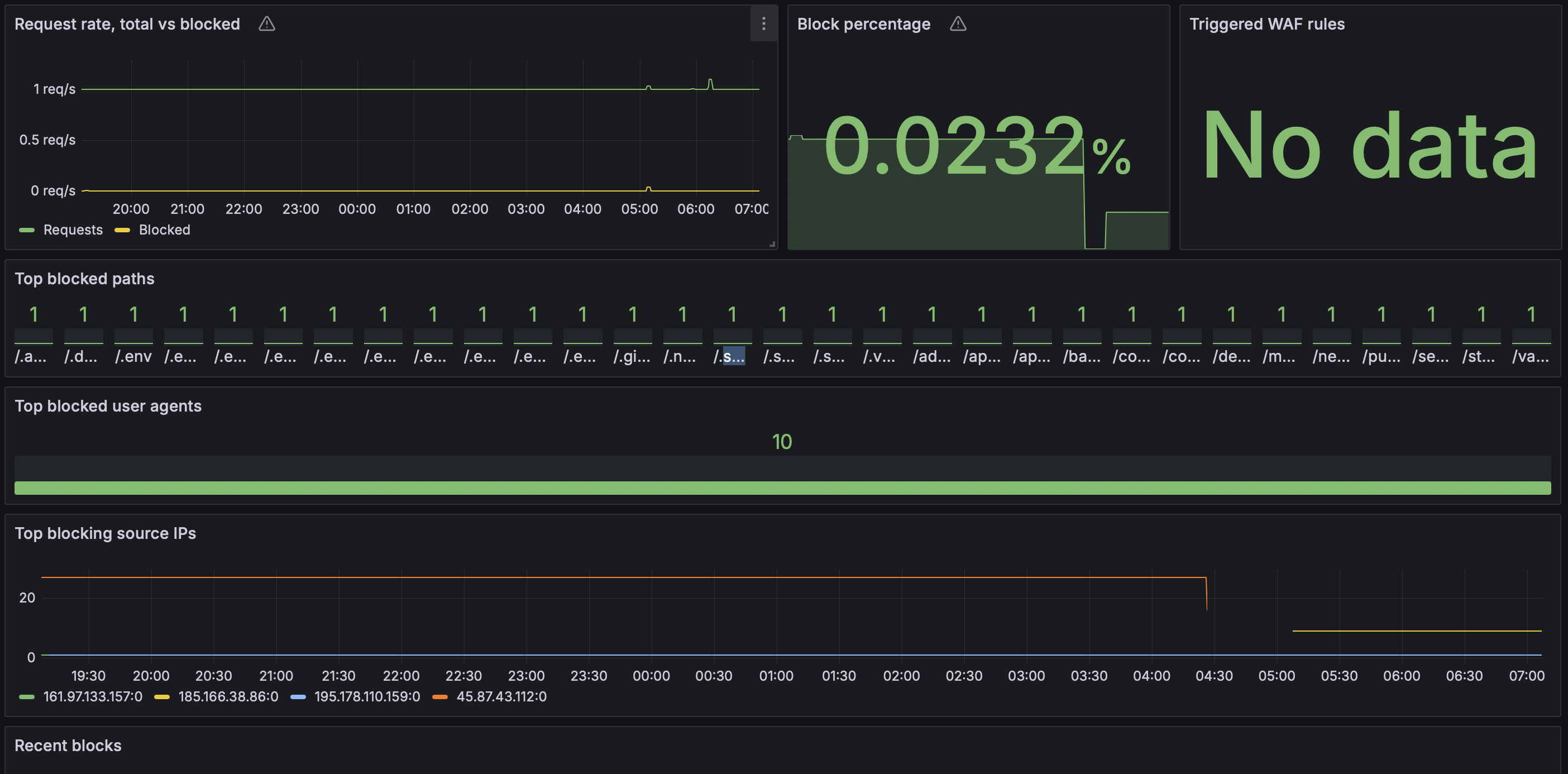
As a lifelong fan of Security Now. I had a TON of fun making this deployment and blog. We hear about these kinds of attacks every single day and I love our industry for having standardize such key protections. Coraza security WAF needs to be monitored and updated constantly but this is a great first step.
References
- [1] Dynamic Modules
- [2] WebAssembly Org
- [3] Envoy Gateway Extensibility
- [4] WASM Extensions
- [5] Coraza Directives
- [6] Coraza Operators
- [7] OWASP Core Ruleset
- [8] Session Fixation